

There’s a note somewhere in my Figma files titled “design principles — revisit.” I wrote it 11 months ago. I have never revisited it.
It’s not that I forgot. It’s that the note was written for a past version of me, with no connective tissue to anything I was working on at the time. It sat there — inert, unlinked, slowly becoming irrelevant.
That’s the quiet failure mode of most knowledge systems for designers. We’re excellent at capturing. We’re terrible at accumulating.
The Post That Broke My Morning
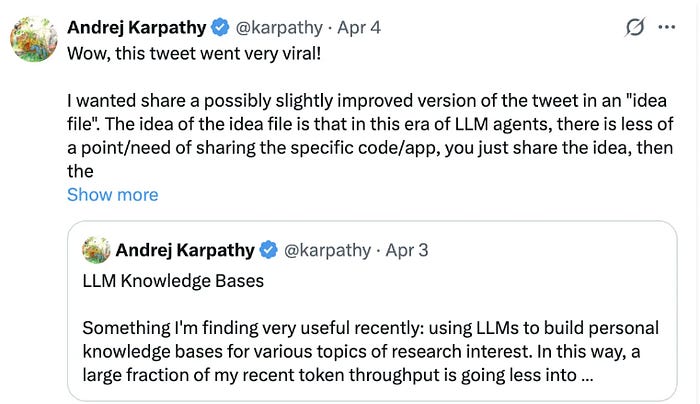
In April 2026, Andrej Karpathy — former Director of AI at Tesla, co-founder of OpenAI, and one of the most trusted voices in the AI field — shared something unexpected. He tweeted that a large fraction of his recent AI usage had shifted away from code generation and toward building personal knowledge bases on research topics he cared about. Medium
The follow-up was a GitHub Gist: a single markdown file he called an “idea file.” The post went viral — 16 million views — and the Gist hit over 5,000 stars within days. It resonated because it solved a problem every knowledge worker quietly has: knowledge bases that collapse under their own maintenance weight. Starmorph
The core idea is deceptively simple. Instead of using AI primarily to write code, Karpathy was using it to compile and maintain an organized, summarized wiki from raw sources — articles, papers, notes — and then using Obsidian to read and navigate it. The AI writes the knowledge base. You read it. Medium
I read the thread at 7am and didn’t open Figma until noon.
What’s Actually Different Here
Most people interact with AI like a search engine. You ask something, get an answer, and move on. Nothing accumulates. Karpathy proposed something different: a plain text knowledge base — a personal wiki — fed directly to an LLM like Claude. No vector databases, no RAG pipelines. Just markdown files and a long context window. MindStudio
The architecture has three layers. Raw sources — your immutable reading material. A wiki — LLM-generated summary pages, cross-references, and concept maps. And a schema file (CLAUDE.md) that turns Claude from a generic chatbot into a disciplined wiki maintainer. Substack
At the time of his post, Karpathy’s wiki on a single research topic had grown to approximately 100 articles and 400,000 words — longer than most PhD dissertations — without him writing any of it directly. Starmorph
What makes this different from a Notion database or a Roam graph isn’t the technology. It’s the workflow inversion. You stop being the librarian. You become the curator.
Why This Matters Specifically for Designers
Designers are knowledge workers with an unusual problem. Our best thinking is scattered across multiple surfaces: Figma annotations, Notion docs, Miro boards, Slack threads, voice memos after a long commute. We generate a huge amount of insight — about users, systems, patterns, decisions — and almost none of it compounds.
The LLM wiki pattern changes that relationship directly.
Imagine a vault where every design critique you’ve ever written, every usability finding, every competitor teardown, every principle you’ve articulated — is stored as plain markdown and queryable by Claude. Not searchable by keyword. Queryable. You could ask: “What have I learned about onboarding flows across the three products I’ve worked on?” and get a synthesized answer grounded in your own work.
One product design leader described switching his entire note-taking workflow to Obsidian specifically because Claude Code could have direct access to his stash of saved articles — without MCP complexity, without data leaving his machine, and without vendor lock-in. Polgarp
For design engineers especially — people who are already comfortable in markdown, already thinking in systems — this is a natural extension of how we already work.
A Practical Starting Point (No Code Required)
You don’t need Claude Code or a terminal to start. The simpler version works in Claude’s chat interface and Obsidian’s free desktop app.
Step 1 — Build the vault structure. Create three folders: sources/ (raw articles, screenshots, research you clip), wiki/ (synthesized notes), and a root CLAUDE.md that tells Claude what kind of knowledge base this is and how to maintain it.
Step 2 — Define what goes in. Before ingesting anything, answer: what is this wiki about, and what sources will feed it? The answer shapes how Claude organizes everything that follows. For a founding designer, that might be: UX research methodologies, design system decisions, competitor product teardowns, and principles I keep returning to. Medium
Step 3 — Ingest and query. Drop a raw source into sources/. Paste its contents into Claude with the instruction: “Read this and add a wiki page to my design knowledge base. Cross-reference anything that connects to existing entries.” Paste the output back into your wiki/ folder as a new markdown file.
Step 4 — Ask it things. The real payoff comes when the wiki has 20–30 entries. Each new note makes Claude more useful. The system compounds. Ask it: “What are my recurring patterns in how I approach navigation design?” or “Synthesize everything I know about design handoff friction.” MindStudio
Obsidian’s canvas feature can turn your wiki into a spatial knowledge graph — nodes connected by relationships, visually navigable the way a whiteboard is. For visual thinkers, this is the interface that finally matches how design thinking actually works. Agrici Daniel
This Is Also a Personal Learning System
The pattern isn’t just for work. Karpathy’s insight connects to a 1945 vision by Vannevar Bush called the Memex — a personal, curated knowledge store where the connections between documents are as valuable as the documents themselves. Medium
For anyone trying to learn in the margins of a busy job — a designer picking up frontend skills, someone studying systems thinking, a founder trying to understand a new market — this is a more honest model than the typical “read more books” advice. You’re not just consuming. You’re building a structure that knows what you know.
The question worth sitting with isn’t whether Obsidian or Claude is the right tool. It’s what a system would look like where your learning actually accumulates — where the insight from a paper you read in 2023 shows up, connected, when you need it in 2026.
Most knowledge systems are landfills. This one is a library that builds itself.
A Forward-Looking Question
Karpathy framed the LLM wiki as the third phase of a shift in how humans and AI collaborate — after vibe coding and agentic engineering, this is the phase where AI manages knowledge, not just code. The human becomes a curator, not a writer. Starmorph
For designers, that reframing is worth taking seriously. We’ve spent years arguing that design is thinking, not making. Here’s a system that offloads the making of notes entirely — so the thinking can compound.
What would your design practice look like if every insight you’d ever had was one question away?
References
Karpathy, A. (2026). llm-wiki.md [GitHub Gist].
Joshi, U. (2026, April). Andrej Karpathy’s LLM Wiki: Create your own knowledge base. Medium. https://medium.com/@urvvil08/andrej-karpathys-llm-wiki-create-your-own-knowledge-base-8779014accd5
Starmorph. (2026). How to Build Karpathy’s LLM Wiki: The Complete Guide. https://blog.starmorph.com/blog/karpathy-llm-wiki-knowledge-base-guide
MindStudio. (2026). What Is Andrej Karpathy’s LLM Wiki? https://www.mindstudio.ai/blog/andrej-karpathy-llm-wiki-knowledge-base-claude-code
Polgár, P.P.B. (2026, February). Knowledge workflow 2026 updates: Obsidian, Claude. https://polgarp.com/blog/Knowledge-workflow-2026-updates/
Halpin, C. (2026, January). Using Claude Code for Product Design. https://clintonhalpin.com/blog/using-claude-code-for-product-design/
AI Maker. (2026). How I Took Karpathy’s LLM Wiki and Built an AI-Powered Second Brain in Obsidian.