

Google AI Studio gave me a beautiful UI in one click. Claude Code gave me a product worth using.
I wanted to build a communication practice tool for founding designers. The kind of app that lets you rehearse high-stakes conversations — pushing back on a CEO’s bad idea, negotiating with a skeptical engineer, defending a design decision to a board — before they happen in real life.
So I built it twice. Once in Google AI Studio. Once in Claude Code.
Same prompt. Same product idea. Completely different results, and not in the way I expected.
What Google AI Studio Got Right (and Fast)
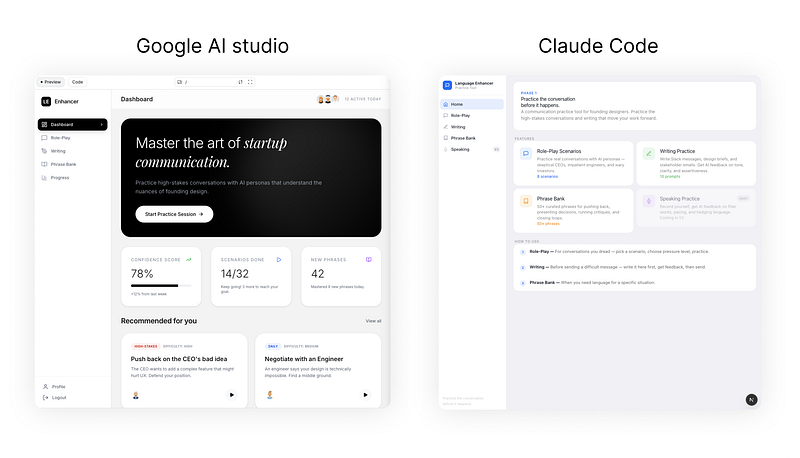
Google AI Studio delivered a working, beautiful interface in one click. I’m not exaggerating. The dashboard it produced had a bold hero card with confident typography, metric widgets showing confidence scores and scenario progress, difficulty-tagged recommendation cards, and clean sidebar navigation. It looked like a product someone would pay for.
If I’d been presenting this to a stakeholder, I could have done it the same day I had the idea. That’s a genuinely remarkable thing. The speed of going from concept to something visually compelling used to take days. Now it takes minutes.
But then I tried to actually use the role-play feature.
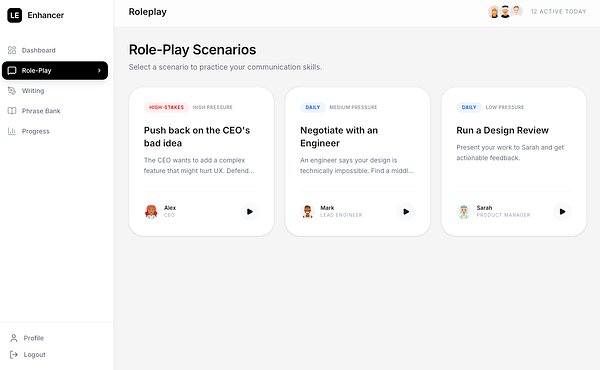
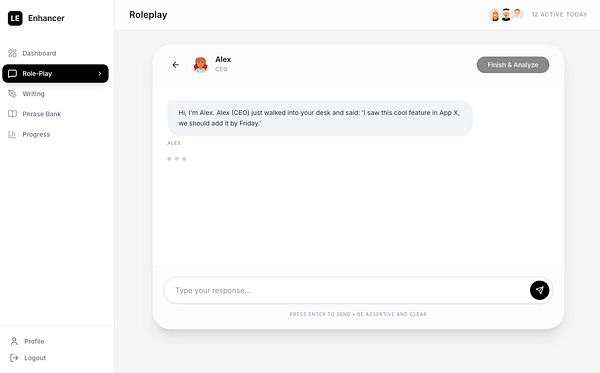
The scenarios were thin. Three options total. No context about who you were talking to, what their personality was, what the stakes were, what a realistic outcome might look like. You’d pick a scenario title — “Push back on the CEO’s bad idea” — and get dropped into a conversation with almost no setup. It was hard to immerse. It felt more like a demo than a tool.
The UI had done its job — made the product look credible. The experience underneath hadn’t kept up.
What Claude Code Got Right (and Why It Took Longer)
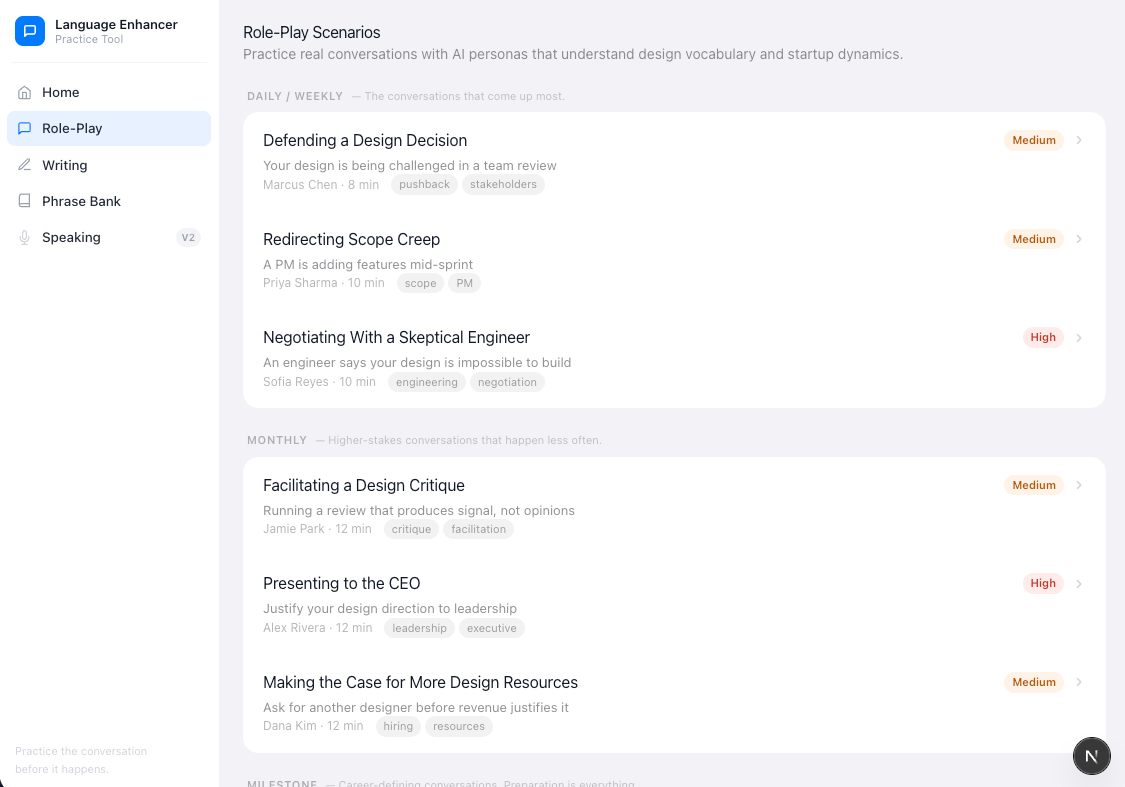
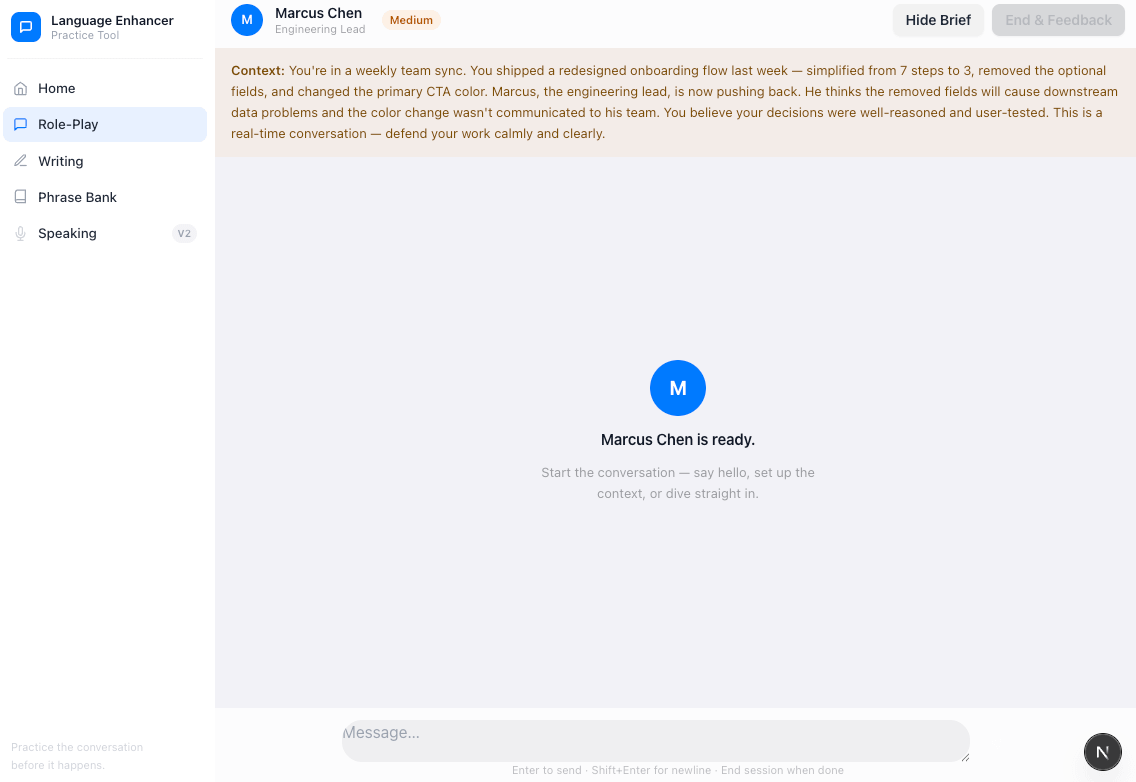
Claude Code took more time to get started. There’s setup involved: you’re working in your terminal, against your actual codebase, with context files you write yourself. It’s not a one-click experience. But the planning behavior was immediately different.
Before building anything, Claude Code mapped the product. It thought through what a role-play scenario actually needs to work — not just a title, but full context: who is the other person, what do they want, what’s their working style, how resistant are they likely to be. It generated difficulty levels so you could calibrate the pressure. And it produced significantly more scenarios — enough that the feature felt like a real content library rather than a proof of concept.
The dashboard it produced was visually flatter. More functional than designed. If you put the two side by side, Google AI Studio’s version wins on aesthetics immediately. But when you use Claude Code’s role-play feature — when you actually sit down to practice a conversation — you can feel the difference in the thinking that went into it.
One version was designed to look like the product. The other was designed to be the product.
The Real Difference Isn’t UI vs. Logic
It would be easy to frame this as a design vs. engineering trade-off. Google AI Studio for visual execution, Claude Code for technical depth. But I think that undersells what’s actually happening.
The more accurate frame is execution speed vs. planning depth.
Google AI Studio optimizes for the feeling of progress. It produces something impressive, fast, and asks questions later. That’s genuinely useful — there are moments in product development where you need to make an idea feel real before you can get feedback, buy-in, or clarity on whether it’s even worth building.
Claude Code optimizes for the quality of the outcome. It slows down to think before it builds. It asks: what does this feature actually need to deliver on its promise? What are the edge cases? What would make a user come back? That thinking shows up in the output — not always visually, but functionally.
Neither approach is wrong. They serve different moments in the same building process.
A Framework for Founding Designers
If you’re a designer or PM building with AI tools, here’s how I’d now think about the two:
Use Google AI Studio when you need to make an idea real fast. Pre-stakeholder meeting. Early user testing. Validating whether the concept even resonates before you invest in the details. Its visual output is strong enough to generate a genuine reaction. Use that reaction as product research.
Use Claude Code when you need the idea to actually work. Once you know the concept is worth building, Claude Code will plan it more rigorously than you might on your own. Give it context — a short PRD, a list of user scenarios, a note on what the experience needs to feel like — and it will surface depth you didn’t ask for.
Treat the Google AI Studio version as a brief for Claude Code. The UI it generates is an excellent visual spec. The gaps it reveals — thin content, missing context, features that look good but don’t work — tell you exactly where Claude Code needs to go deeper.
The workflow that’s emerging among serious builders is roughly: prompt to prototype in AI Studio, then hand it to Claude Code to build the version that actually delivers. One tool for the idea. One tool for the product.
The Judgment Gap
Here’s what neither tool tells you, and what I keep coming back to after running this experiment.
Both tools will give you something that looks and functions like a product surprisingly quickly. The gap between “this exists” and “this is good” is yours to close. Google AI Studio’s version of my role-play feature looked credible. It just didn’t work as an actual practice tool — because making something immersive requires understanding what immersion means to the user, and that’s a product judgment no tool makes for you.
Claude Code got closer, because it was planned. But it still needed me to tell it what mattered.
As the “prompt to product” cycle keeps compressing, the real leverage for designers isn’t knowing which AI tool to use. It’s having a clear enough product instinct to know when the thing you’ve built is actually good — and when it just looks like it is.
That instinct is still entirely human. For now, it’s also the last real differentiator.
What does your two-tool workflow look like — and where do you feel the gap between “looks done” and “actually done” most acutely?
References
Google Firebase Blog. “Vibe Code to Production with Google AI Studio.” March 2026. blog.google
FindSkill.ai. “Google AI Studio vs Claude Code: Which Builds Full-Stack Apps Faster?” March 2026. findskill.ai
Context Studios. “The Complete Guide to Vibe Coding in 2026.” February 2026. contextstudios.ai
Builder.io. “Claude Code for Designers.” March 2026. builder.io
Jock.pl. “Google AI Studio vs Claude Code, Anthropic’s Moment (Mar 2026).” March 2026. thoughts.jock.pl
Stormy AI Blog. “The 2026 Founder’s Guide to the 10-Minute AI Playbook and Claude Code.” March 2026. stormy.ai
Product Hunt. “The Best Vibe Coding Tools in 2026.” March 2026. producthunt.com